Managed Service Letters
Magix Plus has new software that manages the follow up of Service WOF/Reminder letters and text. In today’s environment many dealers are no longer just sending out a reminder and leaving it at that. They are leaving it a number of days and then ringing the customer to make an appointment.
Service Letter Management is accessed through Marketing-Manage Service Letters (shortcuts).
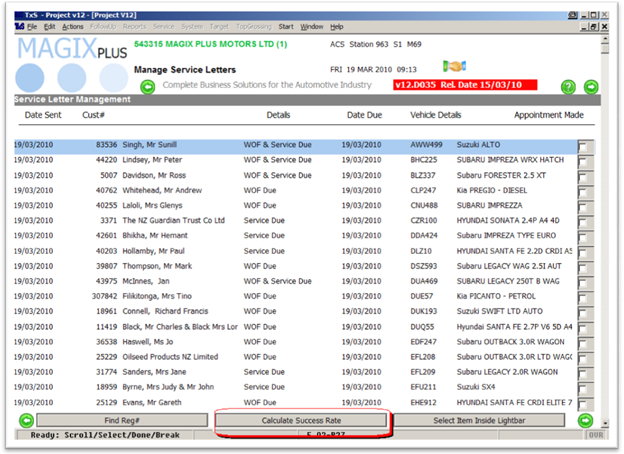
When a customer makes an appointment the system recognizes this and removes the customer from the list.
What is left is the customers who have not make an appointment.
Selecting a customer will show this.
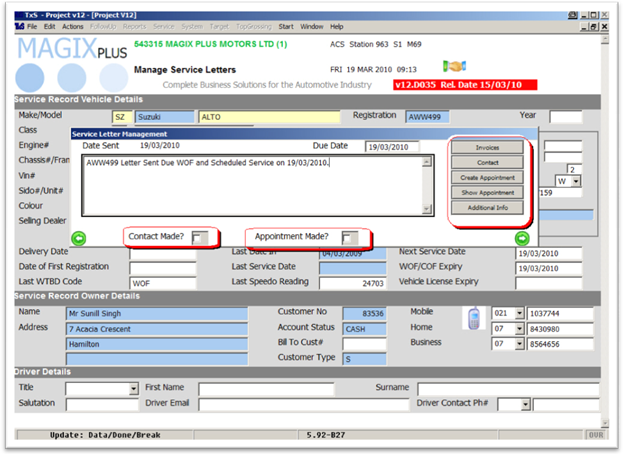
From here, you can ring and follow up the customer.
• Click the Create Appointment button if an appointment is made.
• Enter any comments in the box.
• Tick ‘Contact Made’ if you talked to the customer but no appointment was made.
• Tick ‘Appointment Made’ if you do not use the Magix Plus appointment booking system.
 Calculating Success